

Ad: this article contains a TopCashback referral link, marked (ad). If you join through it and meet the qualifying conditions, I may receive a referral reward. Read my affiliate disclosure.
Last updated: 12 October 2026. General money-saving information, not a guarantee of cashback.
TopCashback not tracking after an online purchase? Check the retailer’s tracking window, then gather your order details and use the missing-cashback process. A blank earnings page does not, by itself, establish that your purchase is ineligible or your money is permanently lost.
I’ve earned about £800 through cashback over time. That is my own experience, not a promise of what you will earn. The practical lesson is to treat cashback as a bonus and keep enough information to follow up when something goes wrong.
This guide helps you separate a missing transaction from a slow payment. If you are new to the process, read how UK cashback sites work first.

Why is TopCashback not showing in earnings?
A missing transaction can reflect a tracking delay, an ineligible purchase or a disrupted referral journey. TopCashback says to submit a missing-cashback claim if it still has not tracked after seven days, subject to the retailer’s specific instructions.
The official tracking help page lists several possible causes. These include blocking software, competing extensions, multiple retailer tabs and leaving the cashback shopping journey.
Avoid diagnosing the problem from one symptom. A purchase made yesterday and an order missing for three weeks need different next steps. Also check that you are looking at the account used for the original click.
Is missing cashback the same as pending cashback?
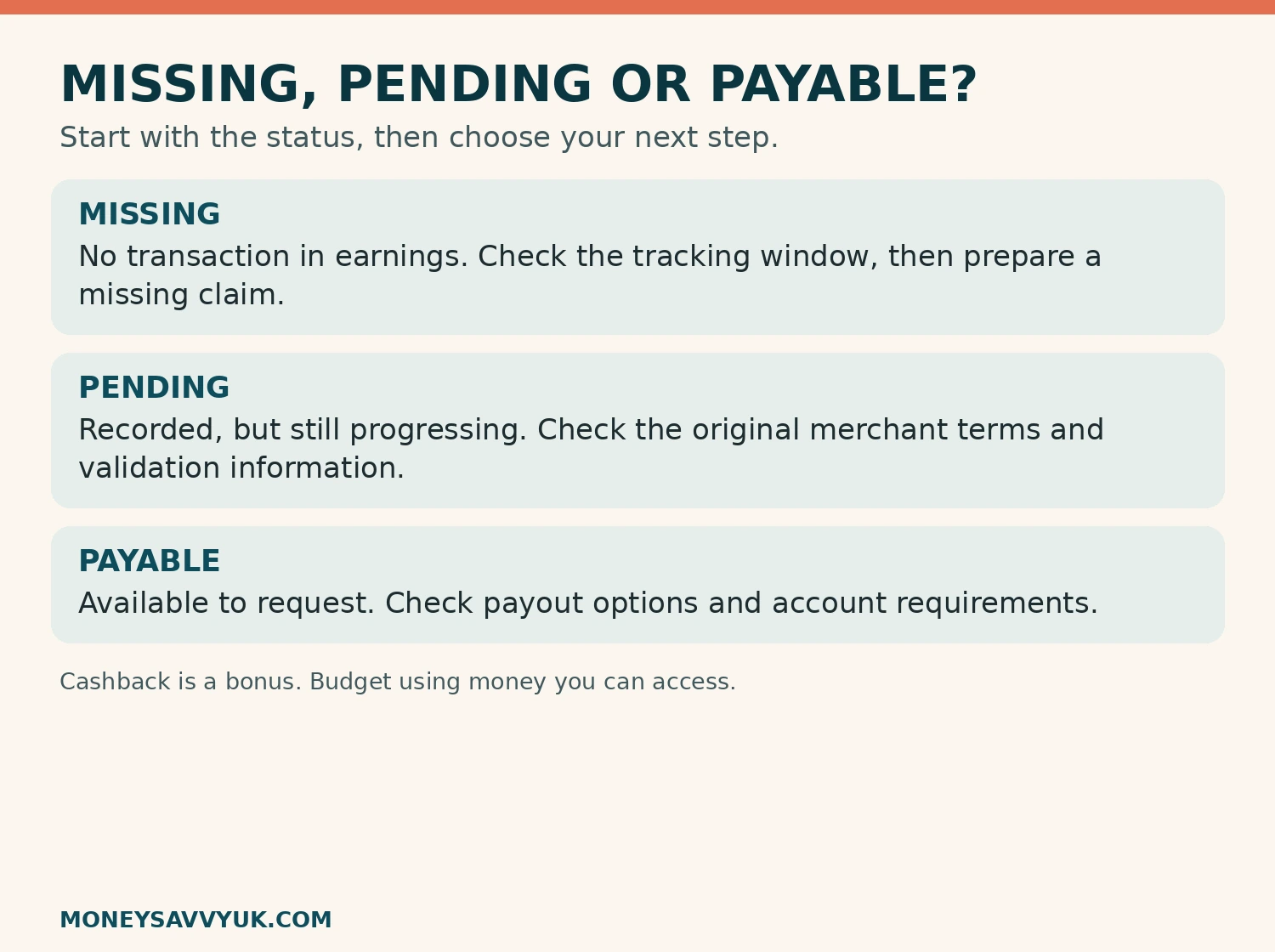
No. Missing cashback means the purchase is not recorded in your earnings. Pending cashback means it has been recorded but is still awaiting progress. Payable cashback is available for withdrawal; a pending balance cannot simply be cashed out.
| What you see | First action |
|---|---|
| No transaction | Check the tracking window and prepare a missing claim |
| Pending | Check retailer-specific validation information |
| Confirmed but not payable | Check progress and payment information |
| Payable but withdrawal unavailable | Check payout details, requirements and support |
| Declined | Read the reason and ask whether a challenge is possible |
TopCashback’s getting-started guide explains the normal progression. Do not file a missing-transaction claim simply because an already recorded transaction has not become payable.
Nine checks for TopCashback not tracking
1. Check the purchase date
Find the retailer’s confirmation email and record the actual order date. Do not use the delivery date or the day a card payment finally appeared on your statement.
Seven days is TopCashback’s general missing-tracking reference point. Read the merchant’s cashback page as well, because special instructions can apply. A different waiting period printed for that retailer matters more than a generic blog checklist.
Put a follow-up date in your calendar. This lets you get on with your week without repeatedly opening the app. It also helps prevent the claim window slipping past while you wait.
2. Check the account and earnings view
Sign in using the email address associated with the original shopping session. Review the earnings list and any filters before assuming the order disappeared.
If the app looks incomplete, compare the same account on the website. This is a useful display check, not proof that switching devices will restore tracking. Keep a note of what each view shows.
Do not open another account through a referral link as a troubleshooting step. An existing user’s missing transaction belongs in their existing account. Account problems should go through official support.
3. Match the order to the offer
Look at the exact cashback category: new customer, existing customer, particular product, subscription or minimum spend. A large headline percentage may apply to only one category.
Check how the eligible purchase value is defined. Some offers exclude delivery, VAT, fees or certain products. The amount charged to your card is not automatically the amount used to calculate cashback.
For example, a hypothetical £120 basket might contain only £80 of eligible items. At an illustrative 5% rate, the calculation would be £4 on that eligible amount, not £6 on the whole basket. This example is arithmetic, not a current retailer offer.
4. Review codes and other reward routes
Did you use a voucher code from another website? Did a browser extension activate another cashback or coupon offer? Record this honestly when checking eligibility.
The retailer’s terms decide which codes can combine with cashback. A successful checkout discount does not establish that cashback remains eligible. Compare the actual checkout saving with the uncertain cashback rather than assuming you can always have both.
Our cashback retailer directory helps you find relevant routes, but the live merchant terms remain essential. There is no universal stacking rule for every shop.
5. Reconstruct the shopping journey
Write down how you reached the retailer. Did you click from TopCashback immediately before ordering, open a saved basket, move into the retailer’s app or visit another promotional site?
These details help support investigate the original purchase. They do not mean that every app purchase fails or every cookie setting is to blame. Describe the journey without guessing a technical cause.
Changing settings today cannot recreate yesterday’s referral journey. Keep prevention and recovery separate: improve the next purchase, then use the claim process for the missing one.
6. Gather the evidence once
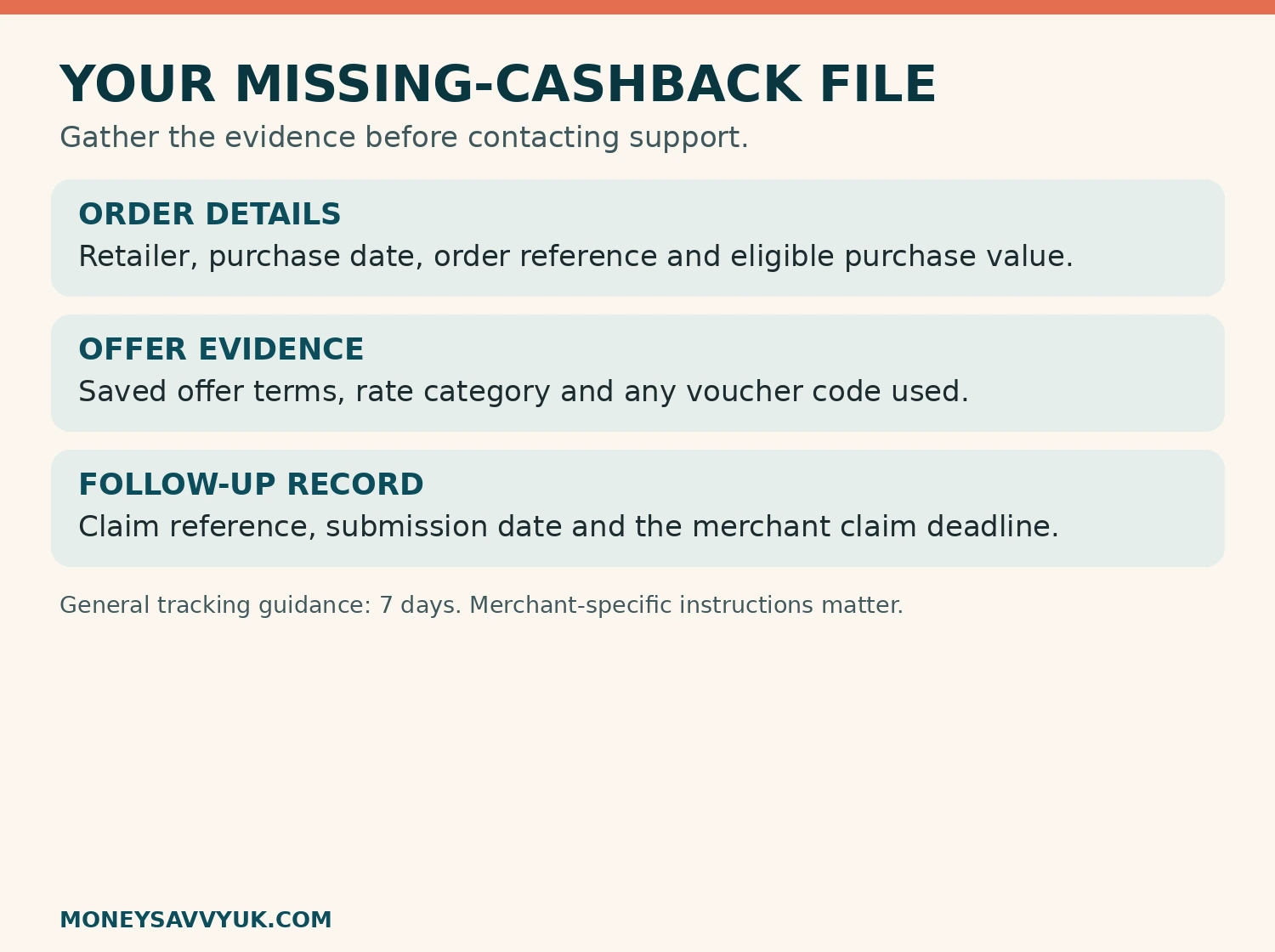
Save the retailer, order number, order date, total, eligible items and confirmation email. Include the cashback offer screenshot if you kept one at purchase time.
Check that the order number is not a delivery tracking number. Where you bought several items or placed multiple orders, keep each order separate. Copying the wrong reference creates avoidable confusion.
Keep evidence in a folder called “Cashback claims”. Add a short note recording when you contacted support and what they requested. Never include your card security code, passwords or full banking credentials.
7. Submit within the retailer’s deadline
Use the official missing-cashback claim guidance. TopCashback says many retailers use a deadline of around 100 days, but the merchant’s own terms set the relevant limit.
Treat that as a reason to act promptly, not permission to wait three months. If the form will not accept the purchase date, the help page says to raise a support ticket so the retailer’s ability to accept a claim can be checked.
Keep the submitted claim reference. Check that the retailer, date and amount are correct before sending. A clear first submission is easier to follow than several overlapping reports.
8. Follow up with useful information
A claim is an investigation, not an immediate payment instruction. Answer requests for missing information and check the account for updates. Avoid submitting duplicate claims for the same order.
If you contact support again, refer to the existing case and explain what has changed. “My order reference was entered incorrectly” is more useful than sending the same complaint repeatedly.
Do not count disputed cashback towards next month’s bills. Use the emergency fund calculator to plan from money you can actually access. A claim might succeed, but the outcome and timing remain uncertain.
9. Keep the retailer transaction separate
If the retailer failed to deliver your purchase, handle that issue with the retailer. A cashback claim does not replace a delivery complaint, return request or payment dispute.
Do not cancel and reorder solely to chase tracking without considering cancellation terms, price changes and the original order. That can turn a small possible reward into a much larger expense.
For large household commitments, compare the underlying price first. Our car-insurance renewal guide shows why the main purchase deserves more attention than a cashback headline.
A missing-cashback support message you can adapt
Hello, I made an order with [retailer] on [date] after clicking through TopCashback. It has not appeared in my earnings after the tracking period stated for the offer. My order reference is [reference], and the purchase value is [amount]. I have attached the confirmation and any offer evidence. Please let me know what else you need to investigate. Thank you.
Only include statements you know are true. If you are unsure whether you used an external code, say so. Do not alter a screenshot or claim that a higher rate applied without evidence.
How can you improve tracking next time?
Use a straightforward shopping journey: check the offer, start with an empty basket, click through while signed in and complete the order without competing cashback tools. Review blocking settings only for that session if you are comfortable doing so.
Use a dedicated browser profile for shopping if that makes extensions easier to manage. It is an organisational choice, not a new TopCashback account. Restore any privacy or security settings you temporarily changed after shopping.
Read TopCashback versus Quidco before choosing one route for the purchase. Clicking both during checkout does not earn two rewards. If comparing rates, finish that comparison before beginning the selected shopping journey.
A small budgeting reset: download the free Financial Reset Kit if you want somewhere to organise spending and follow-up dates. The subscription cost calculator can also identify regular costs worth reviewing.
TopCashback not tracking: FAQs
New to TopCashback? Join TopCashback through my referral link (ad). Check the current offer and its qualifying conditions before joining. Already a member? Sign in to your existing account; you do not need another account to follow this guide.
Can an iPhone setting stop cashback tracking?
Privacy settings and blockers can affect referral tracking, but an iPhone is not automatically the cause of every missing transaction. Check the shopping journey and terms first. Use official support for the original order rather than repeatedly changing settings.
Can I claim after using an unapproved voucher?
An unapproved voucher can make an order ineligible under the merchant’s terms. Check the actual offer rather than assuming every code has the same effect. If the circumstances are unclear, ask support honestly; submitting a claim does not guarantee acceptance.
Does a missing claim unlock my cashback immediately?
No. A missing claim asks for the purchase to be investigated, and any successful cashback still needs the appropriate progress before withdrawal. Plan around available money. A claim acknowledgement or a pending amount is not the same as payable cash.
Should I buy gift cards instead?
Gift-card cashback is a different purchase method, not a repair for a missing order. It can suit planned spending at a participating shop, but introduces expiry, redemption and retailer risks. Read the supermarket gift-card guide before buying.
Save this guide for later
TopCashback not tracking: summary
- Identify whether the problem is missing tracking or slow payment.
- Check the merchant’s waiting period and claim deadline.
- Gather accurate order details and use one clear claim.
- Improve future tracking without creating another account.
- Keep cashback outside your essential spending plan until available.
What information do you now save after a cashback purchase? For more ways to reduce household spending, visit the Save Money hub and free calculators.
Related cashback guides
For the next step, read TopGiftCards and supermarket gift-card cashback.
For the next step, read TopCashback Highest Cashback Guarantee rules.
Sources: Tracking help, missing claims, getting started and terms, checked 12 October 2026.
About Dr Kalpana Govindaraasan: I’m a UK mum, PhD scientist and former science teacher behind MoneySavvyUK. I combine my own money-saving experience with source-based research. I’m not a financial adviser; read the financial disclaimer and my story.