
Updated 11 October 2026. General information, not personal tax or legal advice. Examples below are illustrations, not earnings promises.
Wondering how to make money with Canva UK? You can sell original digital products, create designs for clients or build a small design service, but choosing a useful offer matters more than collecting hundreds of pretty templates.
If you have a busy family life and a limited budget, start with one customer problem and one small product. This guide explains what you can sell, which licensing rules deserve attention, how to price your work and how to test an idea before paying for another subscription.
How to make money with Canva UK: choose your first route
Canva is a design tool. It does not automatically find customers, pay you for opening an account or make every design commercially usable. Your income comes from a buyer, a client or a separate programme with its own acceptance process.
Think about which of these you would prefer: answering a client’s brief, making a reusable product, or managing physical orders. They involve different working hours and risks. A downloadable planner may be delivered automatically, but making it, marketing it and helping buyers still take time.
| Route | What the customer buys | Main work | First small test |
|---|---|---|---|
| Client design | A finished design made for their business | Brief, design, revisions and handover | A clearly scoped flyer or social graphic package |
| Editable templates | A design they personalise in Canva | Original layout, instructions and buyer testing | A five-page pack for one type of business |
| Finished printables | A ready-to-use PDF | Content, layout, print testing and delivery | A focused A4 tracker or checklist |
| Print-on-demand | A physical item printed by a supplier | Design, samples, costs and customer support | One sampled product with a clear margin |
If you need income soon, a small client project gives you a direct way to test whether someone will pay. A template shop can take longer to find buyers. Neither route guarantees a sale. Compare other options in our UK make-money hub before committing your limited spare time.
Can you legally sell Canva designs?
Canva permits some commercial uses, subject to its Content License Agreement. A subscription gives you a licence to use content in permitted ways; it does not transfer ownership of Canva’s stock library.
Check the content source and intended use. Branded assets, editorial-only material and externally uploaded images or fonts may have separate restrictions. Do not promise a client exclusive ownership of a stock illustration.
1. Sell an original product, rather than a stock asset
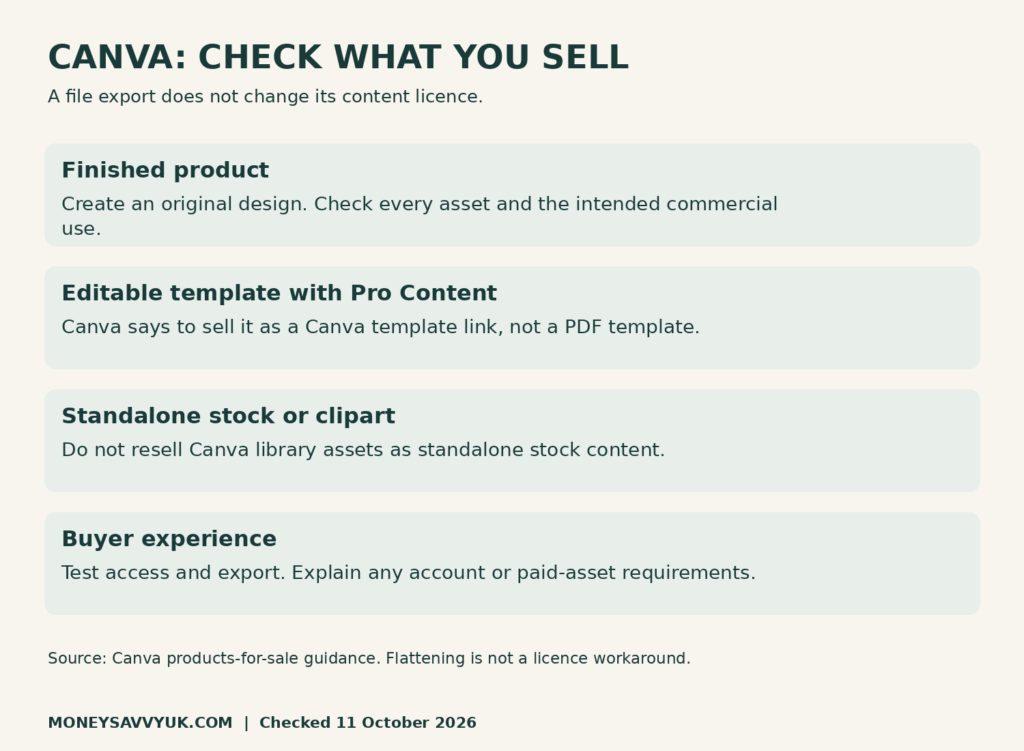
Canva’s products-for-sale guidance requires original designs and prohibits standalone stock resale. Recolouring or cropping an illustration does not automatically make it a new product.
The practical question is what useful work you have added. A revision organiser with your own instructions, a clear timetable and a thoughtful layout offers a customer a complete tool. A downloaded flower sold as clipart offers them someone else’s asset. Start with your own content and build the design around its purpose.
2. Distinguish finished products from editable templates
A ready-to-use guide differs from an invitation layout that a buyer must customise. Canva says templates containing Pro Content must be sold as Canva template links, rather than PDF or other template files, even when flattened. Its guidance also covers permitted finished products and print-on-demand designs.
Decide what you are selling before choosing assets. If the buyer needs to edit the result, write that clearly in the listing. If it is a finished printable, show an accurate preview and explain that layout editing is not included.
3. Do not use flattening as a licensing workaround
Exporting a design as an image changes the file, not the underlying permission. It does not remove a restriction, turn licensed content into your property or prove that a buyer can reuse it commercially. Locking a layer is also an editing convenience, not a copyright safeguard.
A simpler beginner approach is to use your own graphics, basic layouts and permitted Free assets. Check every item, and test the finished customer journey. If you need a particular Pro asset, assess the actual licence and disclose any buyer requirements before selling.
4. Keep commercial work separate from education access
The agreement limits Canva Education use of Pro Content to educational, non-commercial purposes and directs commercial designers to use a separate account. It also restricts using stock content in trademarks, with an exception for fonts. Check the current terms before selling logo packages.
For a small business branding job, offer a consistent colour palette, typography and layouts within a clear brief. Avoid describing a stock-based logo as an exclusive, trademark-ready identity. If registration is important, the client needs appropriate original artwork and specialist advice.
Five Canva side hustles worth testing
The ideas below are product hypotheses, not a list of proven bestsellers. A narrower customer group makes research easier, but it does not guarantee low competition or instant visibility. Look for a problem people can describe in their own words.
5. Social media design for a specific small business
A local dog groomer, tutor or independent shop may need consistent graphics without hiring someone full time. Your offer could be six branded posts supplied in agreed sizes, with one revision round and a short handover guide.
Show three fictional samples labelled as samples. Explain what the package includes, what the client must provide and when you can deliver. Do not invent past clients, testimonials or conversion results. A clear, modest portfolio is more useful than claims you cannot substantiate.
Keep copywriting, posting and account management separate unless they are part of the price. A client who orders graphics may assume captions are included if you never explain the boundary. For a related service route, see our Pinterest virtual assistant guide.
6. Editable business template packs
Build a small pack around one task: a craft-market announcement, price list, opening-hours sign and thank-you card, for example. Keep the visual style consistent and make text boxes easy to edit.
Before expanding, ask a prospective user what they currently create repeatedly. Their answer may be a booking reminder rather than another Instagram quote. Avoid regulated documents such as legal contracts or safety certificates unless you have the relevant expertise and appropriate review.
Include a quick-start page, a list of supplied designs and a statement about permitted customer use. Your own customer licence must respect the underlying asset licences. Buying your template does not automatically let someone resell the template or its components.
7. Practical UK household printables
Examples include an A4 school-week organiser, a moving-house checklist or a household spending tracker. UK spelling, pounds and suitable paper sizes can make a product more convenient. Localisation alone is not enough: the tool must help someone do a job.
Test a planner using realistic fictional entries. Does a weekly spending sheet leave enough room for long shop names? Does a savings tracker add up correctly? Can someone use it without an explanation from you? These checks improve the product more than adding decorative pages.
For examples of how MoneySavvyUK presents money tools, browse our printable shop. These are our own products, not evidence that a new shop will achieve a particular income.
8. Original educational resources
If you understand a subject, your knowledge can be the value in a worksheet or revision organiser. Write your own explanations and questions, check answers and describe the intended level accurately.
Do not reproduce textbook pages, exam-board artwork or protected question banks without permission. A design tool cannot make copied educational content commercially usable. Check curriculum references and avoid suggesting approval from an exam board when there is none.
A useful first product could be one well-tested revision tracker with a sample completed page. Ask an appropriate user to check whether the instructions make sense. Accuracy, readability and accessible contrast matter more than an elaborate cover.
9. Print-on-demand with original artwork
You can explore mugs, cards or tote bags, but a supplier printing and posting the item does not remove your customer-service responsibility. Canva’s sale guidance makes supplier copyright terms relevant: having a licence is different from owning the underlying content.
Check the supplier’s agreement, UK delivery options and returns process before uploading a design. Order a sample. Compare colour, print placement and packaging with your listing photographs. A mockup helps present an idea, but it should not conceal what the physical item actually looks like.
Work backwards from the selling price. Include manufacturing, delivery, marketplace fees, refunds and advertising. A £20 order can leave a small margin after those costs. Avoid buying a large batch of stock simply because the unit price appears attractive.
Do you need Canva Pro to make money?
You can explore finished designs using a free account and permitted assets. Paid features may save time, but the product and its delivery method determine what you need.
There is an important distinction for editable products: Canva’s current sharing guidance lists template-link creation as available on specified plans, including Pro, rather than Canva Free. Check your account’s current options before advertising an editable template. Education access is not a commercial shortcut.
Buyer access is a separate question from your account. A template containing Pro assets may require additional licensing or a subscription for the buyer’s export. Use a separate Free account to test, and say clearly whether the buyer needs Canva and which features or assets require payment.
Before adding a subscription, use our subscription cost calculator. Ask whether its monthly cost saves enough time or enables enough actual work to justify it. Having a business idea is not the same as having business revenue.
How to deliver an editable Canva template
10. Create a clean customer copy
Keep a master design separately. Remove personal information, hidden pages, old client details and notes from the copy you will share. Canva warns that publicly shared designs can expose content that is not immediately visible, so review the whole copy.
Use a proper template link where your plan permits it. Do not send an “anyone can edit” collaboration link to your master. Verify that opening the delivery link creates the intended buyer copy rather than allowing changes to your original.
11. Put instructions in a delivery PDF
Create a short PDF with an access link, what is included, basic editing instructions and how to contact you. Name the file clearly. If you sell several products, make the product name visible inside each delivery document.
Tell buyers that an internet connection and a Canva account are needed for an editable Canva product. Explain download formats, printing assumptions and any limitations. Avoid promising lifetime access unless you have a realistic plan to maintain it.
12. Test the purchase-to-use journey
Open the PDF on both a phone and a computer. Follow the link as a buyer, replace sample text, export the result and inspect it. For printables, print at the intended size and check margins on a normal home printer.
Check that your listing promises exactly what the files deliver. A printable PDF and an editable template are different purchases. If the product is A4 only, say so rather than letting a buyer discover this after checkout.
Where to sell: Etsy, Payhip or Gumroad?
Choose one platform for your first test. Having three shops triples some administration without proving that anyone wants the product. Marketplace traffic can be helpful, while a direct storefront generally needs you to bring visitors.
| Platform | Current fee starting point | What to consider |
|---|---|---|
| Etsy | US$0.20 listing fee; 6.5% transaction fee; UK processing 4% + £0.20; UK regulatory fee 0.48% | Other charges can include setup, advertising, currency conversion and applicable VAT on fees |
| Payhip | Free plan: 5% platform transaction fee, plus payment processor charges | Bring your own audience; check digital VAT settings |
| Gumroad | Direct sales: 10% + US$0.50; Discover sales: 30% | The fixed dollar component matters on small orders; check tax-inclusive pricing and payout terms |
Fee sources checked for this guide: Etsy fees, Etsy Payments, Etsy’s regulatory fee, Payhip pricing and Gumroad pricing. Check again before setting prices.
For a hypothetical £10 Etsy order, those percentage fees total £1.098 and the fixed UK processing fee adds £0.20. That leaves £8.702 before the listing fee, VAT on fees, advertising, refunds, design costs and income tax. It is an illustration of selected fees, not a complete payout quote.
Read our Etsy fees and tax guide before choosing your price. Then use the Etsy beginner guide for the shop setup steps.
How much can you realistically earn?
There is no reliable beginner income you can assume. Some people make no sales. Others develop repeat clients or a catalogue that sells regularly. Without your own sales data, monthly income figures are targets to test, not forecasts.
Suppose a product leaves £6 per sale after the selling costs you have included. Recovering £60 of initial costs takes ten sales. Reaching £300 of contribution takes 50 sales, before income tax and any costs you left out. Ask how those customers will find you.
For a client package priced at £75, five hours of total work means £15 an hour before costs and tax. If revisions and messages take another five hours, that becomes £7.50. Record all the time, including quoting, administration and finding clients.
Write a revision limit and payment terms before starting. Do not describe a digital product as passive income when you still need to create traffic and support customers. A small repeatable offer is a better first milestone than an unsupported full-time income claim.
UK tax and digital VAT: keep these separate
HMRC’s trading allowance guidance refers to gross income before expenses, across relevant trades, rather than £1,000 profit per shop. Eligible income of £1,000 or less may not need reporting, but exceptions apply and records are still needed.
Above £1,000 gross trading income, registration for Self Assessment is generally required. You normally choose eligible actual expenses or the trading allowance, rather than deducting both against the same income. Read our side-hustle tax guide and sole-trader registration guide.
Platform sales tax handling does not settle your personal income tax. Payhip describes automatic digital UK and EU VAT handling by default, with settings affecting whether tax is included in the displayed price. Gumroad describes itself as a merchant of record for sales-tax handling. Check what your chosen platform covers and seek advice for sales it does not handle.
Track gross sales, platform fees, refunds, subscriptions and other costs separately from money arriving in your bank. Our side-hustle tax calculator provides an estimate, with assumptions, to help you plan.
A manageable first-month plan
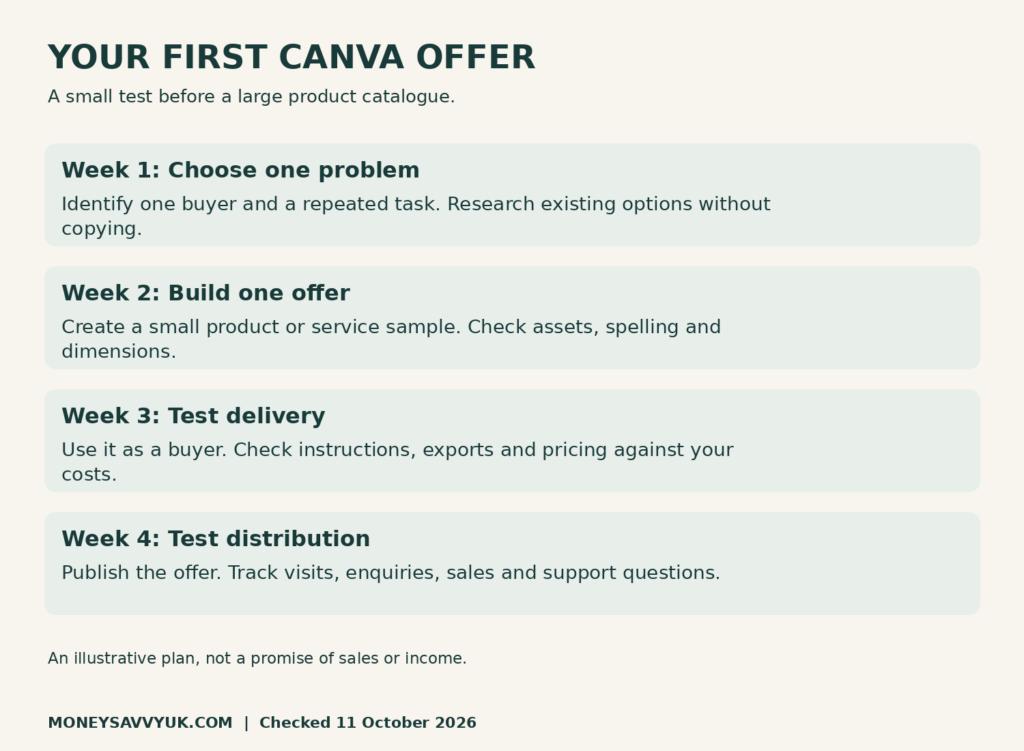
Week one: choose one buyer and one recurring problem. Review comparable products, note what they include and speak to potential users where appropriate. Do not copy their work.
Week two: build one small product or service sample. Check assets, spelling, dimensions and instructions. Set a spending limit before paying for tools.
Week three: test delivery and usability. Prepare a clear listing with accurate previews and limitations. Work out a price using costs and your time.
Week four: publish your offer and test one relevant way to reach buyers. Track visits, enquiries, purchases and support questions. Use our Etsy SEO guide or Pinterest SEO guide according to the route you chose.
If visitors arrive but do not buy, examine the offer and listing. If nobody sees it, examine distribution. Making 50 more products before understanding that difference can leave you busy without moving the business forward.
Frequently asked questions
Can I make money with Canva Free?
You can make some finished commercial designs using permitted assets on a free account. Editable-template delivery may require a plan that supports template links. Check both the content licence and your account’s features before selling.
Can I sell Canva templates on Etsy UK?
You can sell original templates that comply with Canva’s terms and Etsy’s policies. Templates containing Pro Content must be delivered as Canva template links. Clearly explain buyer account and asset requirements.
Does flattening Canva Pro elements make them free to resell?
No. Exporting or flattening changes a file, not the licence. Do not use it to bypass restrictions or promise buyers rights you cannot grant.
Is the Canva Creators programme guaranteed paid work?
No. It is a separate application route with its own requirements. Check the official Canva Creators page for current options; do not base a household budget on acceptance or an assumed payout.
Do I pay UK tax on Canva income?
Income may be taxable. The trading allowance concerns eligible gross income across relevant trades, with exceptions. Platform VAT handling is separate from your income-tax duties. Keep records and check HMRC guidance for your circumstances.
Save this guide for later
Start with one useful offer
You do not need a huge shop to test a Canva side hustle. Choose one problem, create a product or service that helps with it, check the permissions and test what a customer receives. Then judge the idea using real enquiries and sales.
Keep the household budget steady while you learn. If you want a structured place to organise spending, browse our MoneySavvyUK budgeting printables. Which offer could you build and test without committing money you need for bills?